
Network Deployment for Linux
Nur einen Moment... / Just a moment...
Freie Software und Bürgerrechte benötigen Deine Aufmerksamkeit!
Handeln gegen Überwachungsstaat und Softwarepatente
Wenn Du auch in Zukunft in einem Staat leben möchtest, der nicht dem Überwachungsstaat aus "1984" gleicht, und/oder Du möchtest, dass weiterhin jede(r) Software entwickeln und vertreiben kann, gibt es verschiedene Möglichkeiten, sich zu engagieren. wir möchten Dir diese fünf Organisationen empfehlen:
Free software and civil rights need your help!
Act against police state and software patents
If you don't want to live in a state à la "1984" and you want that development and distribution of software should remain legal for everyone, then you have different possibilities to get into the act. We would like to recommend these five organisations:






For Linux-Tag in Berlin, we still have some few free tickets and we would like to invite you to our booth 102 in hall 7.2a.
If you would like to get a Linux-Tag e-ticket, send us an email containing your email address where we shall send the e-ticket - and as there are really only a few tickets left, please also tell us why you would like to visit us at our m23 booth. We will then give the tickets to those who gave the most interesting/funniest/best reasons.
You can write either a normal email or use the contact form on the top right of the m23 page.
Have fun - and meet you in Berlin!
In 2012, m23 is again participating in "the most important place for Linux and open source software in Europe" :-). Provided that there will be no further changes in the hall plans, your will find us in hall 7.2a at booth 102 at the Messegelände unter dem Funkturm (fair ground under the radio tower in Berlin from 23. to 26. Mai 2012.
At the m23 booth, we are expecting Tux (in person!) as the quiz show host for the m23 quiz. Our visitors are invited to accept the challenge! The quiz has been extended by some new questions so that visitors who took part last year will again enjoy the quiz. On every day of the fair, the great m23 T-shirt lottery will take place, where everyone who has previously put his name into the lottery box, has the chance to win one out of two cool geek shirts kindly provided by getdigital.de.
Though, visitors of the fair looking for serious information won't be disappointed at our booth: The m23 main developer himself will demonstrate the m23 software at the booth, answer your questions and welcome your suggestions. With the help of a diorama, posters and info material everyone can find out more about m23 and its functions. And maybe, but only maybe, we will also bring a new m23 version with us to LinuxTag!
We are looking forward to meet you!

In m23 12.2 rock, CentOS 6.2 now complements the list of distributions which can be installed and administered with m23. The support for CentOS - like for Fedora14 and openSUSE 11.4 before - was implemented by using the halfSister extension. In addition to this, new features have been added to the halfSister API, the French help texts have been revised and the usual 'bits and pieces' have been added.

CentOS 6.2 is the first halfSister distribution which m23 can install on 32- as well as on 64-bit systems. The community distribution CentOS is based on Red Hat Enterprise Linux (RHEL) and is fully binary compatible to it. It is focused on stability and long-term support and (along with Debian) it constitutes a possibility when you need a system that can be employed in the long run.
Great thanks is due to Philippe Gaunet in this m23 version for the revision of the French m23 help texts and the improvements that have been incorporated into the other language versions.
The halfSister API was complemented by calls for changing user names and passwords. The hardware setup was adapted in such a way that it is now possible to install data partitions on a software RAID and to even allow an installation of some distributions on these. To simplify the development of the m23HSAdmin scripts for the different distributions, there is now the new tool checkForMissingHSFunctions.sh, to check if all implementations have the same functional range.

Beside the important changes, there are, of course, also some less obvious improvements. For example, the mount points of partitions are now shown when the mouse pointer is hovering over the info icon. After the creation of a disk or partition image, the client will be shut down or re-booted, depending on its state before the creation of the image. During the search for packages, an animation is now shown and after completion of the search, the long package descriptions and the package sizes in MB are now listed for all distribtutions. Further changes concern the administration of the m23 administrators. Passwords can now contain any kind of character and after logout from m23, the index page of the m23 server is now shown automatically.
Only very rarely, a function is removed from m23, and until now, this fate only occured to outdated distributions which were no longer maintained. This version is an exception of that practice, as it deactivates the plugin interface and removes it from the menu. As far as it is known to us, this interface was never used. However, if there is someone among you who needs this function, now would be a good time to tell us ;-)
Now, let's talk about the bug-fixes: For Debian/Ubuntu, the main user and his/her password for an m23 client can now be changed. For the creation of an image, the necessary SSL certificates are now loaded to the m23 client and the SSH server dropbear is started. To make an immediate formatting possible for complicated partitioning situations, after every creation and deletion of a partition a number of tools are started that forward the changes made on the partition table to the kernel. In the update.php, a syntax error was eliminated, that had led to the problem of update information never being shown.
The latest version is available as update via the m23 interface, via APT, as ISO file to burn the m23 server installation CD or as pre-installed virtual machine (the last two can be found in the download section).
Have fun!


This year, an m23 talk will given at the CeBIT again. It will be held - like last year - in the program of CeBIT für Alle! on Friday (2012-03-09) at 4pm at the Univention booth (hall 2, booth D48).
I will present the obligatory m23 introduction and new developments concerning m23 like the m23 remote administration service or the almost completed support of CentOS 6.2 via halfSister.
If you would like to give some 'face-to-face'-feedback to me about m23, I would be happy to meet you at the CeBIT and exchange ideas with you! Please write me a message (eg. via "Send message to developer" at m23.sf.net), when you're interested, so I can manage the appointments ;-)
Have fun - and maybe: Meet you at CeBIT!
The new year has only just begun - and already, a new m23 version with many new features and (of course) some corrections is available! Among the highlights, you will find the "m23 remote administration service", the reactivation of openSUSE and Debian Lenny, the migration to new mirrors, support for arbitrary file systems and extended package manager settings (e.g. LibreOffice from Debian backports) in the package sources lists and a Java applet for accessing the "m23 VirtualBox OSE Console" directly from the m23 interface.
"on-demand" administration help
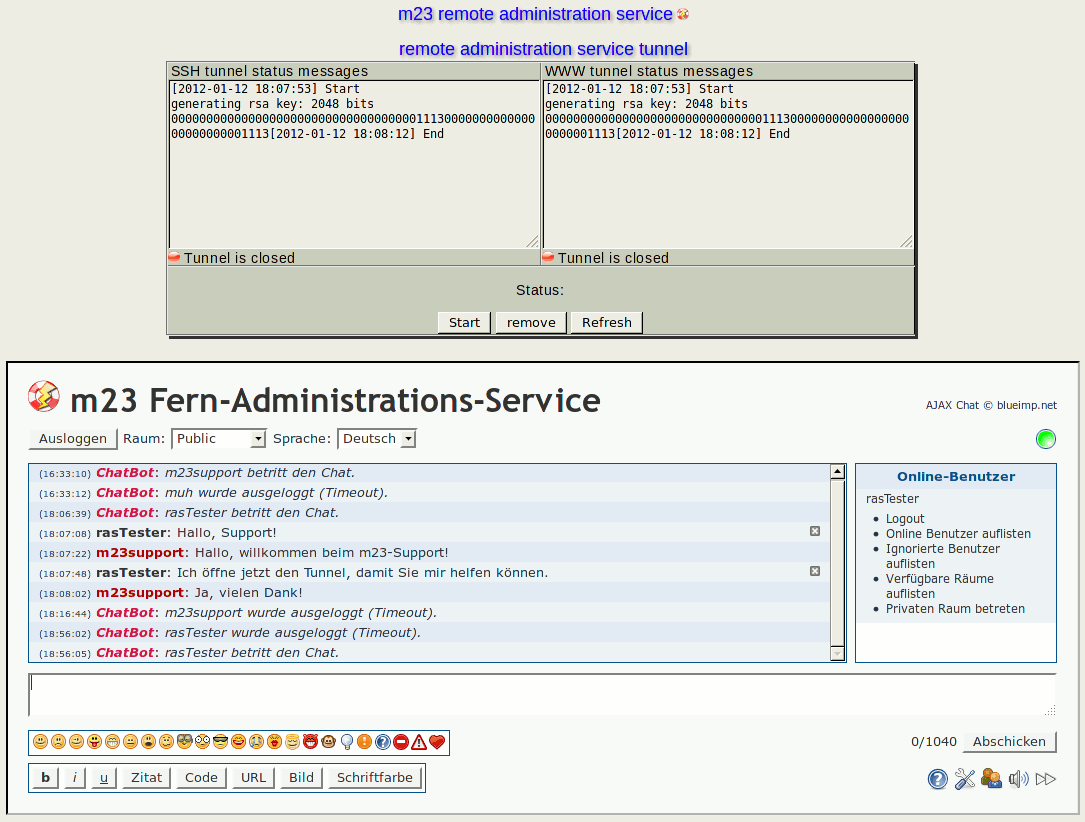
One key aspect is the new m23 remote administration service. The support of goos-habermann.de can help you to manage your m23 server and clients if you choose to use this service. For this purpose, the m23 server integrates an encrypted port forwarding, which goos-habermann.de can use to access your m23 server (only if registered and activated). You can activate this realtime administration when you need it. In addition, the new chat function integrated into the m23 interface provides a direct connection to the support of goos-habermann.de.
Download server migrations (and more)
The new m23 version had to make some structural adaptations due to changes on external servers.
openSUSE reactivated: The mirror, which was used for openSUSE is no longer available and was replaced by another mirror in the package sources list.
Debian Lenny reactivated: A similar problem was created by the restructuring of the SourceForge file release system (FRS), which creates an additional HTML page, if a file cannot be downloaded. This additional page was recognized by the m23 client as base system archive, which led to Debian Lenny not being able to install from the Debian packages. Instead, the client installation routine tried to unpack this erroneous base system archive, which obviously must fail.
Faster package downloads: The packages for m23 server and client have now moved to the SourceForge FRS servers. This is a big advantage, as download and installation now happen faster and the m23 community web page will not be blocked again because of too many downloads ;-).
Creation of xorg.conf more robust: The script m23-xorg.conf-generator.sh, which is responsible for the creation of the xorg.conf, now has a more robust routine, which performs a better check on the existence of VirtualBox guest addition packages and the ISO and downloads and installs them correctly.
New Trinity mirror: There is now an extra mirror for the Trinity Desktop Environment in the FRS.
Nagios plugins: To be able to spot failures of the SourceForge downloads faster, there are now two Nagios plugins to check for the base system archives (check_baseSysAvailability) and Debian mirrors (check_debSourceChecker) along with an example configuration (debSourceChecker.cfg). Of course, these plugins are not only interesting to m23 users ;-)
Extended package sources lists
The package sources lists were extended by further configuration options, where the file systems supported by the distribution can be indicated and the package manager can be configured individually.
Support for new file systems: Until lately, the file system ext3 - which is supported by all m23 distributions - was the least common denominator. As ext3 is not exactly up-to-date, we needed a solution, which allows a more individual and current selection of file systems per distribution. If an older distribution (for example one without support for ext4) is chosen after partitioning and formatting, there will now be an automatic conversion of the formatting to a supported file system.
Debian now also with LibreOffice: Another improvement allows to create configuration files, which can, for example, contain settings for the package manager of the distribution. The new package source "squeeze+libreoffice" uses this option by including the LibreOffice packages from the backports and rising their priority in order to allow a normal installation.
Interface improvements
The m23 interface has also undergone some improvements.VNC applet: Specially for Java fans, the m23 interface now contains a signed Java applet, by use of which you can access the "m23 VirtualBox OSE console" directly from the browser (if the Java plugin is present and activated). Additionally, you'll find an easy way to sign your own Java applets in the script java-jar-signer.sh.
The small things: The m23 interface now lists special packages in a form easier to read. After the adding of a new client, a message is displayed saying that the client can now be booted via network (including different options), menu entries that were clicked on are now also displayed as clicked-on and the server update page now has a reload button to check if the update is still on the way.
Corrections and improvements
Beside the aforementioned download problems, further corrections and adjustments to m23 have been made.
Ubuntu specific: The integration of existing Ubuntu 11.10 and 12.04 systems is now possible. The SSL certificate check by wget was deactivated permanently, as, due to a bug, these Ubuntu versions do not accept the server certificate (even if the certificate is embedded).
openSUSE specific: The installation of openSUSE systems now again runs smoothly till the end. Packages have been changed, deleted or replaced by others, which disrupted the m23 installation routine. Cron is now explicitly deactivated during system installation, so that no further tasks will be fetched from the m23 server if another task is still running. XFCE will now be entered as standard desktop environment in the login manager when it is installed.
Package sources editor: Package sources lists may now contain quotation marks. Before, with every save, the quotation marks were doubled ;-)
DHCP management: Unnecessary entries of clients, which need not be booted via network, will now be deleted from the dhcpd.conf, which also allows a correct display of the network boot status. In addition to this, network booting can be (de)activated on the client status page.
Long-term SSL certificates: The SSL certificate of the m23 server is now valid for 10 years.
You can get the latest m23 version as update (via the m23 interface), via APT, as ISO to burn your own m23 server installation CD or as preinstalled virtual machine (the last two to be found in the download section).
Have fun!
Search
Give m23 your reference!
 Help m23 by giving us your reference!
Go to questionnaire >>
Help m23 by giving us your reference!
Go to questionnaire >> Download m23