
Network Deployment for Linux
Nur einen Moment... / Just a moment...
Freie Software und Bürgerrechte benötigen Deine Aufmerksamkeit!
Handeln gegen Überwachungsstaat und Softwarepatente
Wenn Du auch in Zukunft in einem Staat leben möchtest, der nicht dem Überwachungsstaat aus "1984" gleicht, und/oder Du möchtest, dass weiterhin jede(r) Software entwickeln und vertreiben kann, gibt es verschiedene Möglichkeiten, sich zu engagieren. wir möchten Dir diese fünf Organisationen empfehlen:
Free software and civil rights need your help!
Act against police state and software patents
If you don't want to live in a state à la "1984" and you want that development and distribution of software should remain legal for everyone, then you have different possibilities to get into the act. We would like to recommend these five organisations:





The newest m23 version contains comprehensive and maybe the biggest changes of all m23 versions. Part of these changes is the integration of the free virtualisation software VirtualBox OSE that can be used to create virtual m23 clients directly from the m23 webinterface. The virtual clients can be managed like normal m23 clients. New are the m23 blogs on the welcome page and lots of internal changes too.
VirtualBox OSE in m23
 The free virtualisation solution VirtualBox OSE is now part of m23 (optionally) and can be installed directly on the m23 server or on the managed m23 clients. Required for virtualisation is a current Debian system (Debian Lenny 5.0.x). Virtual m23 clients, that act on the network like normal m23 clients, are managed via the m23 server as usual. These virtual clients can be partitioned and formatted like a normal PC and of course the operating system and additional software can be installed as well.
Self built VirtualBox OSE packages are available for 32 and 64 bit machines, that can be installed directly via the m23 web interface on the m23 clients. These m23 clients are virtualisation hosts for virtual m23 clients after the installation. Virtualisation may be useful to use the existing ressources of your computers better (e.g. office PCs that usually wait for user input most of the time).
You can check for the usage of harddisk and memory on the virtualisation host in the "VM creation dialog" before you create a new virtual m23 client. So you can take care to not assign too much harddisk space or memory to the VM. The newly created VM runs thru the usual 3-step-setup after the creation is done.
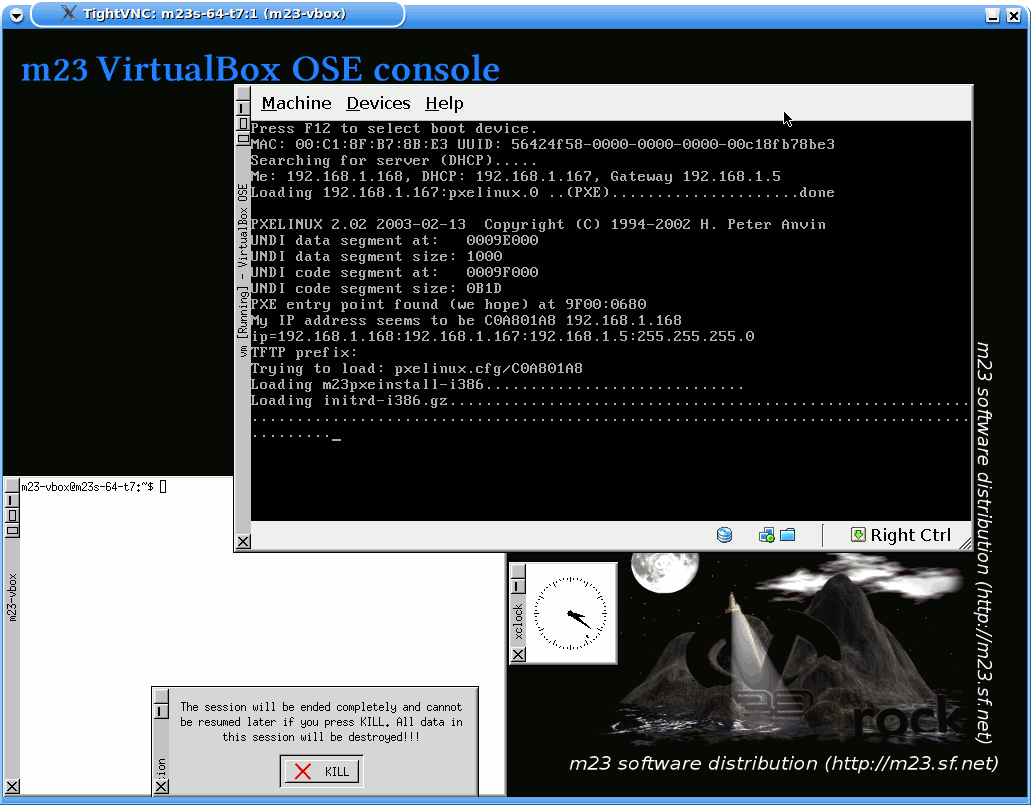 Virtual m23 clients can run in graphical mode or without visible output. A modificated VNC server was integrated for the graphical output to replace the VRDP feature of the non-free VirtualBox edition. It can be used to access the virtual clients from the booting and allows to engage if problems occur. The VNC session contains the VirtualBox window with the running virtual m23 client and is based on the lightweight window manager flwm. An analog clock, a terminal and a button to shut down the session together with the VirtualBox machine are visible too.
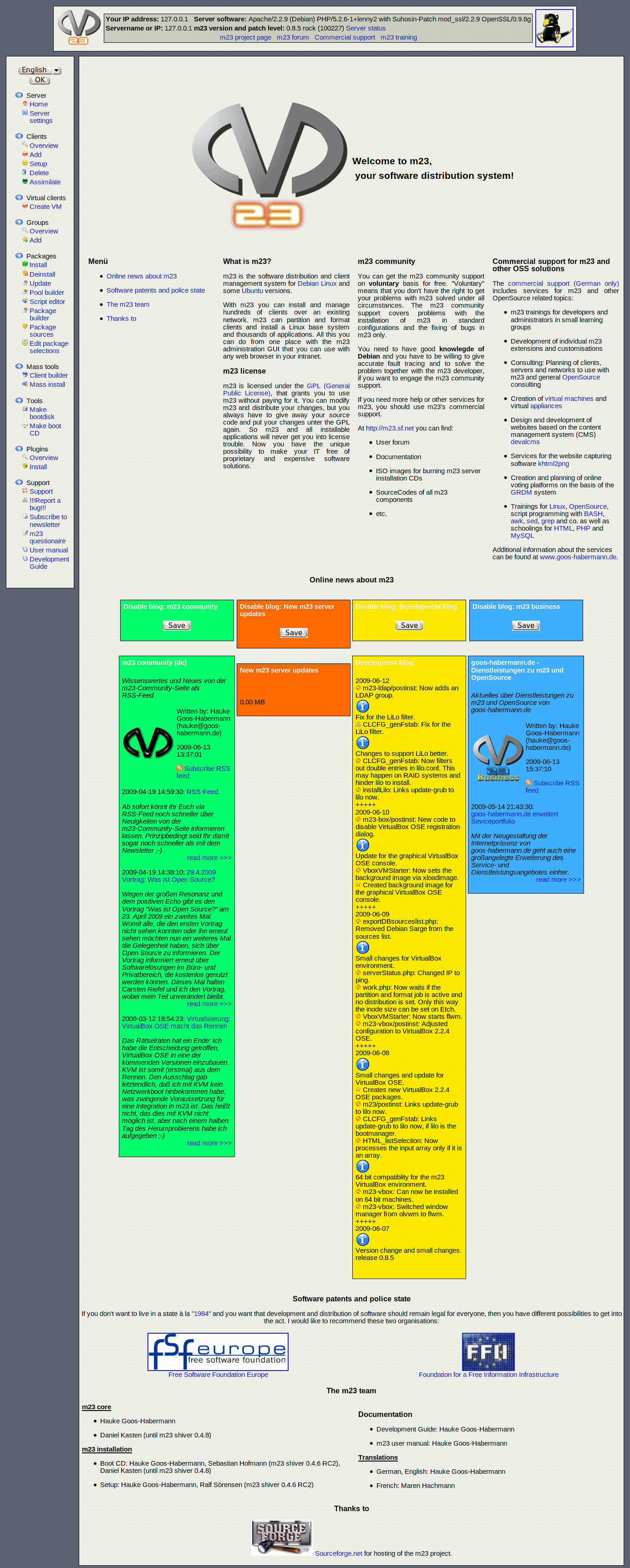 The complete update of the welcome page should be one of the obvious changes in this release. Not only the design was altered but four blogs were added too. These blogs keep you informed about the development of m23 and of course these blogs can be disabled if you don't like them ;-)
There is the m23 community blog that contains the news from the well-known m23 community page. "New m23 server updates" lists (as the name may already say) all new updates that are not installed on your m23 server. The development log contais the last made changes on m23 that were done by me. And last but not least there is "m23 business" with news about commercial services around m23 an other OpenSource tools from my commerial service page goos-habermann.de.
Changes
Here are some changes that are listed in short:
- The m23 server installation CD can now be used to install m23 on "very big" hardisks (tested with a 2 TB virtual VirtualBox harddisk drive).
- Some cleaning on the package sources lists: The m23 software package contains only package source lists for Ubuntu Gutsy, Debian Lenny, Etch, testing, unstable and Sid now.
- Values of HTML elements can now be stored in a session and loaded back. In addition these sessions can be stored in the database. This generic behaviour replaces the separate handling of presettings on several pages of the m23 webinterface. The usage of the new functions lead to a drastic shortening of the code in the client adding dialog.
- The compiling of 64 bit Linux kernels and other 64 bit tools is possible on 32 bit Debian Lenny now.
- The client details page was revised and is based on functions now, that allow an easy adjusting and adding of new options.
- The partition type is set on the creation of new partitions. This should fix problems that may occur in rare cases e.g. during grub installation.
- The bootmanager LiLo can now be used if the operating system is installed on a RAID 0 or RAID 1.
- Two new warning dialogs were added, that warn, if there is another DHCP server on the network or you try to install Ubuntu on a client.
- Debian Etch can be installed with the new network bootimage now.
- A LaTeX environment gets installed if the documentation creation menu entry in the m23 development kit is hit.
- Now it is possible again to change the root password on m23 clients.
The new m23 release is available - as usual - from the m23 community page (m23.sf.net) in the menu bar under "Downloads". You can get m23 as server installation ISO image or as preinstalled VirtualBox image. Existing m23 servers can be updated via APT or the m23 webinterface.
Have fun!
The news of the m23 community page are available as RSS feed now to keep you informed about m23 quickly. You will be even faster than reading the m23 newsletter ;-)
The RSS feed of the m23 community page is available in English and German like you know it from the web page and the newsletter. To subscribe to the RSS feed just click on the link with your preferred language:
You can watch the RSS feeds in special RSS reader if your webbrowser doesn't support RSS. Just copy the desired link into it and get informed.
Have fun!

The speculation about the used virtualisation software come to an end: I've decided that VirtualBox OSE will be included in the next m23 versions. So KVM will not be included because I could not start a KVM virtual machine via network booting. This feature is essentially for the inclusion into m23. Maybe network boots are possible with KVM too, but I simply didn't figured it out in a half day of try and error ;-)
The decision to use VirtualBox OSE was not as easy as it may seem, because the open source version removes the graphically remote control software that allowes to log into the VM during its boot. The next m23 release will contain a VNC server that brings back this remote control ablility. Every virtual machine will run in a seperate VNC dektop that allows the admin a direct manipulation of the VM in case of errors. It is possible to run the VMs in headless mode (without visual output) too. In this case m23 or whatever is executed in the VM must include a solution for remote control.
The development blog on the m23 community page contains hints about the so far implemented management functions for VirtualBox. Basic actions like the creation of virtual machines and virtual harddisks and the booting in the VNC desktop are working yet. The actions can be executed on the m23 server itself or the m23 clients. The virtualisation features will allow a better usage of the capabillities of the m23 clients by running virtual m23 clients on them. It will last some time if all virtualisation functions are implemented and working ;-)
I have found annother approach for virtualisation in the software OpenVZ during my evaluation of virtualisation solutions and research. In my eyes OpenVZ is fascinating, because it doesn't create a hardware simulation environment, but executes several instances of an operating system on a single machine. These operating system instances act like a normal client in the network as they can be reached over an IP. This wouldn't make OpenVZ much better than other virtualisation products, but the fact that only 2-3% of speed should be lost, makes it a very nice piece of software. I will check if OpenVZ will become the next virtualisation solution that gets integrated in m23 when I've finished VirtualBox.
Have fun!
Now there is available a new server installation ISO image for the current m23 version. This is the first ISO that contains the new stable Debian 5.0 release named Lenny. So you will not only get the new m23 version but also a new Debian distribution, if you install it.
There are not much functional differences towards the 0.7.1 packages, but the changes will come with the next updates. A virtualisation solution will be integrated into the m23 server. It will be possible to run virtual machines on the m23 server and the m23 clients that can be administrated like normal m23 clients then. I'm thinking about a function that let you migrate a real machine to a virtual machine and deploying it to m23 clients. At this moment I've not made a decision when to implement what function, but be sure that I will keep you informed at a given time ;-)
At the moment I'm not sure, if I will use VirtualBox OSE or KVM. Both solutions are possible because they are licensed under the terms of the GPL. In the next time I will evaluate both and make a decision.
The new ISO can be downloaded from here.
Have fun!
Search
Give m23 your reference!
 Help m23 by giving us your reference!
Go to questionnaire >>
Help m23 by giving us your reference!
Go to questionnaire >> Download m23