
Network Deployment for Linux
Nur einen Moment... / Just a moment...
Freie Software und Bürgerrechte benötigen Deine Aufmerksamkeit!
Handeln gegen Überwachungsstaat und Softwarepatente
Wenn Du auch in Zukunft in einem Staat leben möchtest, der nicht dem Überwachungsstaat aus "1984" gleicht, und/oder Du möchtest, dass weiterhin jede(r) Software entwickeln und vertreiben kann, gibt es verschiedene Möglichkeiten, sich zu engagieren. wir möchten Dir diese fünf Organisationen empfehlen:
Free software and civil rights need your help!
Act against police state and software patents
If you don't want to live in a state à la "1984" and you want that development and distribution of software should remain legal for everyone, then you have different possibilities to get into the act. We would like to recommend these five organisations:






The talk about m23 (in German) I gave at CeBIT, was broadcast live by RadioTux on March, 5th 2011 (noticeable by the questions from the IRC chat put through to me by the RadioTux show host ;-) ) and is now available as OGG and MP3 recording in the RadioTux blog.
Besides, I came across the project "Traduction française du Full Circle Magazine", which translates the english editions of the "Full Circle Magazine" to French. Therefore, you can find the article about m23 « Installer Ubuntu avec m23 » in Edition 45. There is a page listing all editions in french translation at fullcircle-mag.fr, edition 45 can be downloaded as PDF file here. Of course, for all non-French-speaking people interested in m23, there is the original edition in English available here as PDF file.
Have fun listening and reading!

Deviating from my normal proceedings, I proudly announce a preview version of m23 today. Initially, I had planned to finish the "real" version of m23 rock 11.1 for CeBIT, but I got caught up in more diversions than I would have thought (e.g. the new m23-Partner Program). As the testing is not yet completed, I call the version published today a "preview version" ;-).
The innovations presented in this preview mainly consist of the support of quasi any Linux distribution by use of the new halfSister extension. Installing m23 clients with Fedora 14 and its KDE currently works. Additional packages can be searched, (un)installed and updated. I will deliver a detailed description after the conclusion of the testing of m23 rock 11.1.
Those who want to get to know a little more beforehand, can meet me at CeBIT, where I will be giving a talk about "Softwareverteilungssystem m23 für Debian und Ubuntu (The software distribution system m23 for Debian and Ubuntu, in German)" at 4.30 p.m. at the Univention Open-Source Bühne (hall 2, stand D36). I will bring some m23 CDs, too ;-)
You can find the preview version in the download menu as an ISO-file.
Have a lot of fun - and maybe - meet you at CeBIT!
 halfSister is a new abstract method of m23 to make quasi any Linux distribution installable and administrable with m23.
How does halfSister work?
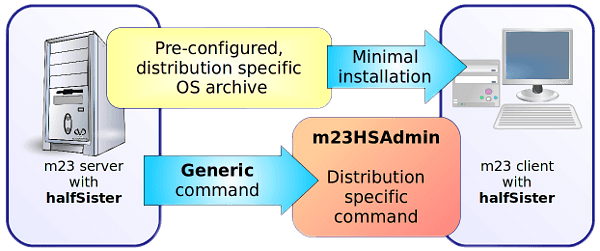
A minimal base system of the according Linux distribution is installed from a compressed and pre-configured archive. This way the usage of distribution specific tools like debootstrap or rpmstrap for installing a minimal system is avoided. A similar routine is used for speeding up the installation of Ubuntu with m23.
For every new distribution that m23 shall master, there is an adequate tool in the form of a single file. This file contains a set of commands, which are consistent within m23, for all administrative tasks and their counterparts for the according distribution. That is why m23 doesn't need to "know" how a specific package manager works and how it is used. It doesn't matter if the native package manager is yum, APT or something else. On every system, the command for updating the package list is "m23HSAdmin pkgUpdateCache" and the installation of the package "mc" is done by "m23HSAdmin pkgInstall mc". Other commands of m23HSAdmin call the native tools of the distribution for setting up the network, the installation of the bootmanager, for adjusting the system language etc.
Current status
| Distribution | 32 bit archive | 64 bit archive | m23HSAdmin | m23hwscanner | In m23 since | Status |
|---|---|---|---|---|---|---|
| Fedora 14 | HS-fedora14-i386.tar.7z | X | m23HSAdmin-fedora14 | m23hwscanner-fedora14 | 11.1 | Removed (since m23 19.1) |
| openSUSE 11.4 | HS-opensuse11.4-i386.tar.7z | X | m23HSAdmin-opensuse11.4 | X | 11.3 | Removed (since m23 19.1) |
| CentOS 6.2 | HS-CentOS6.2-i386.tar.7z | HS-CentOS6.2-amd64.tar.7z | m23HSAdmin-CentOS6.2 | X | 12.2 | Removed (since m23 19.1) |
Participate? Participate!
Would you like to make your favourite distribution installable and manageable with m23? You only need basic knowledge about your favourite distribution, the script language BASH and about how to create a minimal system of your favourite distribution.
Interested? Then just send us an email, use the form "Send message to developer" or post into the forum.
Have fun!
How to fit your favourite Linux distribution to halfSister
Three steps are necessary to fit a new Linux distribution to m23 halfSister:
- Creation of a minimal base system
- Development of the m23HSAdmin script
- Creation of a package sources list
Creation of a minimal base system
In the first step you should create a minimal base system of the new distribution, which only contains components necessary to install further packages and to configure the system. Besides the coreutils, the programs wget, awk, sed, bash, bzip2 and the command line package manager and the command line configuration tools should be installed. The aim is to create the distribution directory tree within a directory and to compress it afterwards.
Creating the distribution directory tree
Depending on your distribution, there are different ways to do this: For Debian-based distributions you can use debootstrap. For RPM-based systems, there is "rpmstrap". These two programs create a new minimal system in a directory. If there is no such tool for your favourite distribution, maybe there is a container available among the OpenVZ Linux Containers, that could serve as a basis. You can unpack the container into a directory. Another option is to install the distribution with the usual installation medium (you could do this in a virtual machine) and to remove all unnecessary components. The smaller your minimal system is, the better. In no case, applications like office programs, the Linux kernel or desktop environments should be contained.
Hint for OpenVZ Linux Containers: The containers may use misconfigured and modified software that will only run in an OpenVZ environment correctly. You may fix this by deinstalling all unneeded packages and re-installing of the remaining packages. (This works eg. for the CentOS 6.2 container)
Example: How to proceed using debootstrap:
su

mkdir /tmp/mydistro

cd /tmp/mydistro

debootstrap squeeze .
Installing further programs
To be able to install further programs to this newly created system, you need to "chroot" into it. This means that you change the distribution in your current shell - everything you do after the "chroot" happens in the directory of your new distribution.
Example: How to proceed for Debian:
chroot .

apt-get install wget gawk sed bash bzip2

exit
Compress the base system
For m23, the archives of your minimal system must be saved as a tar file and compressed with 7-Zip.
To pack the current directory, execute the following command:
tar -c --same-owner *| 7zr a -t7z -m0=lzma -mx=9 -mfb=64 -md=32m -ms=on -si HS-[distroname]-[architecture].tar.7z
You will have to replace "[distroname]" by the name of your distribution (including the version number, without space characters). "[architecture]" is either "i386" for 32-bit distributions or oder "amd64" for the 64-bit variations. Finally, copy the file into "/m23/data+scripts/distr/halfSister/" on your m23 server.
Development of the m23HSAdmin script
The m23HSAdmin script is the link between the commands from the m23 server and the distribution-specific administration commands of the client distribution. It works like this:
The m23 server sends a command, for example m23HSAdmin netSetIPNetmask 192.168.1.23 255.255.255.0 to the m23 client. Here, the function netSetIPNetmask in the m23HSAdmin script is called. The function transforms the command that sets the IP address and the netmask into the proper commands for the respective distribution. Of course, there are a lot of other functions apart from setting the network parameters, that allow a complete administration of a client distribution.
The individual functions can best be understood looking into an existing m23HSAdmin implementaion for Fedora 14 or OpenSUSE 11.4.
Now it is your task to find a suitable replacement for every single function for you favourite distribution. When you have completed this for all the functions, save your script to "/m23/data+scripts/distr/halfSister/m23HSAdmin-[distroname]". Replace "[distroname]" by the name of the distribution you have already used for the archive of the minimal system (with version number, but without indication of the architecture, as the script is the same for both architectures). Now, most of your work to fit your favourite distribution to m23 is already done :-)
Creation of a package sources list
Every distribution that can be installed with m23 also needs at least one package sources list. This list contains the servers from which software packages can be downloaded for installation on the client.
These lists are managed with the m23 interface. Go to "Packages" → "Package sources" and follow the step-by-step instructions:
- Choose "halfSister" for "Distribution" and click on "Select".
- Under "Release", your distribution should now be listed. Choose it from the list.
- Check the architecture(s) for which you have created your minimal system archive(s) at "Architecture".
- Enter a name for your list at "Package source name". The name has to start with "HS-", in order for m23 to recognize it as a halfSister list. A comment about your list can optionally be entered into the field "Description".
- Enter the package sources information for the distribtution into the text field "Package source name:". Depending on the distribution, this list can vary a lot (examples for package sources lists for Debian, Fedora 14 and OpenSUSE 11.4).
- Then, you still have to add the lines
#alternativeFS: ext4
#supportedFS: ext2, ext3, ext4, reiserfs - In the list "Supported user interfaces", select all interfaces which are fully supported by your distribution and for which you have written all necessary m23HSAdmin functions.
- Finally, click on "Save".
When everything is done correctly, you can now lean back and watch m23 installing your favourite distribution! :-)
 At this year's CeBIT in Hanover, I will be giving a talk on Friday, March 3rd 2011, 4.30 p.m. - 5 p.m. about the software distribution system m23 for Debian and Ubuntu in German ("Softwareverteilungssystem m23 für Debian und Ubuntu") on the Univention Open Source Stage (Open Source Bühne, Hall 2, Stand D36). Apart from giving an introduction to m23 for those not (yet) knowing about m23, I will inform you about future prospects of m23 developments. In my bag, I will also bring the latest development called "halfSister", which provides generic support of virtually any linux distribution. Maybe I will even be able to present you m23 rock 11.1 with support for halfSister on time for CeBIT ;-)
Information regarding the other talks given at the Univention Open Source stage can be found at CeBIT für alle (in German).
Those who always longed to meet me in person, have the opportunity on Friday, March 3rd 2011 all day long at the CeBIT. Just contact me upfront if you are interested to meet up with me ;-).
For all friends of mobile internet use, the m23 community web site is now available as mobile version for devices with low resolution and bandwidth. At m23.sf.net/mobil you can check the whole site and read the blog at m23.sf.net/mobilblog.
Have fun - and maybe: Meet you at CeBIT!
The cleanups are going on: The SourceForge team did a very good job after the server attact and did not only restore the services, but changed some settings on the server infrastructure too.
These changes are making sense in one or the other way, but lead to blackouts of the m23 page. The SourceForge database server was moved and made the m23 forum unavailable. I noticed this later and could fix it easyly, but I would be pleased, if you help to identify faults and report them to me by eMails to let me fix it quick.
Have fun!
Search
Give m23 your reference!
 Help m23 by giving us your reference!
Go to questionnaire >>
Help m23 by giving us your reference!
Go to questionnaire >> Download m23