
Network Deployment for Linux
Nur einen Moment... / Just a moment...
Freie Software und Bürgerrechte benötigen Deine Aufmerksamkeit!
Handeln gegen Überwachungsstaat und Softwarepatente
Wenn Du auch in Zukunft in einem Staat leben möchtest, der nicht dem Überwachungsstaat aus "1984" gleicht, und/oder Du möchtest, dass weiterhin jede(r) Software entwickeln und vertreiben kann, gibt es verschiedene Möglichkeiten, sich zu engagieren. wir möchten Dir diese fünf Organisationen empfehlen:
Free software and civil rights need your help!
Act against police state and software patents
If you don't want to live in a state à la "1984" and you want that development and distribution of software should remain legal for everyone, then you have different possibilities to get into the act. We would like to recommend these five organisations:






In this year's Thomas-Krenn Open Source Förderung (Thomas-Krenn Open Source promotion), the m23 project has ended in the third place :-) At this point, we would like to thank Thomas-Krenn again for the prize and congratulate the other winner projects.
If you'd like to know more about the prize and the other winners, visit the article of the tkmag at Thomas Krenn.
For our prize money, we compiled a selection of hardware from Thomas-Krenn, which we want to use for being able to execute a whole bunch of virtual client installations at the same time. In the long term, we are planning to automate most Tests using the newly introduced test framework "AutoTest", to avoid doing all those tests manually, which was the case until now. We hope to spend less time on manual testing and at the same time to be able to expose a larger range of functions to continuous testing.
We will publish a small report on the new hardware after having tested it extensively.
Our sincere thanks are given to Thomas-Krenn and, of course, to our users for their support :-)

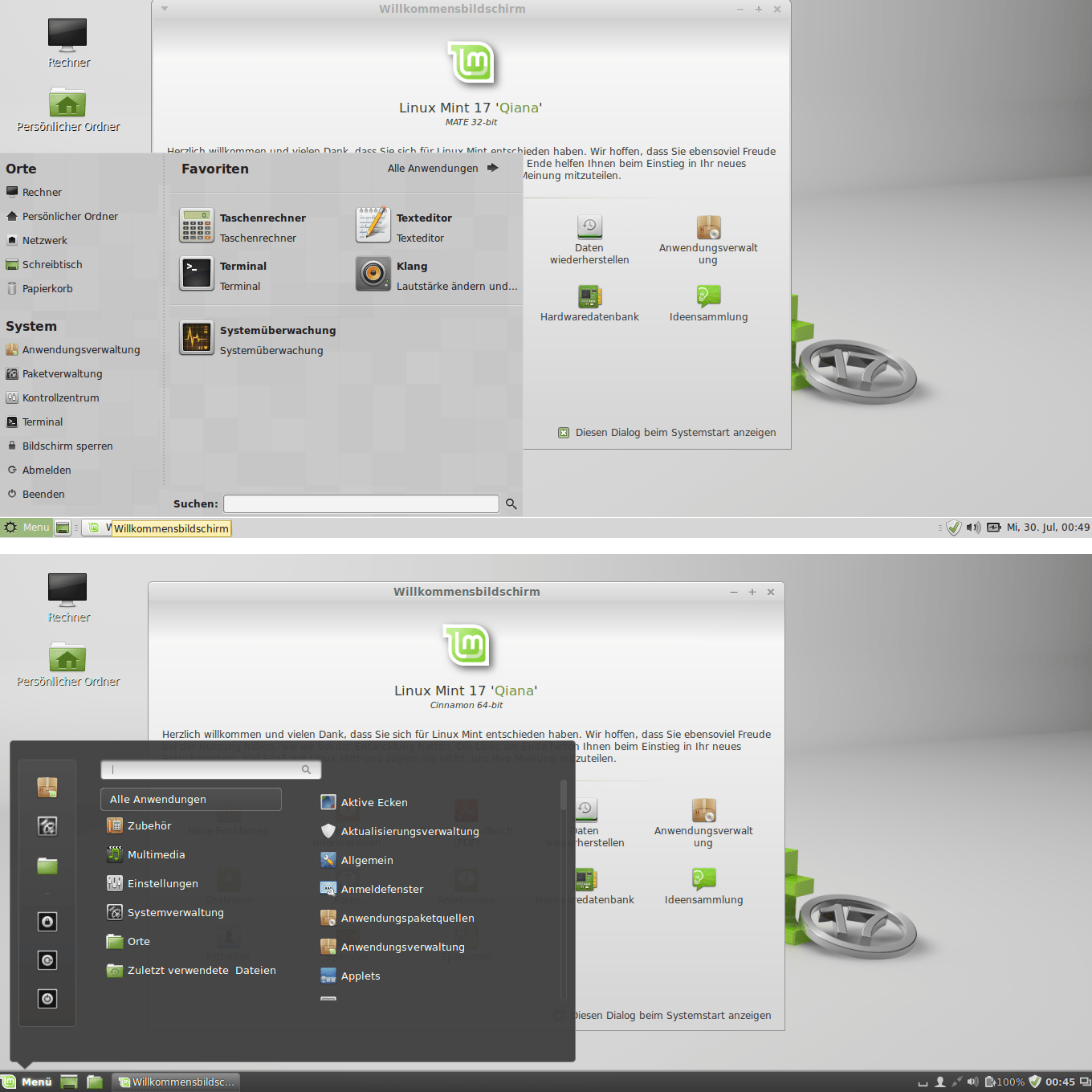
Linux Mint 17 Mate and Cinnamon
The latest version of m23 extends the spectrum of supported client distributions by adding support for Ubuntu 14.04 LTS and Linux Mint 17 Qiana. For Linux Mint, the desktop environments Mate, Cinnamon, Xfce and KDE are available - for Ubuntu, there are a minimal KDE/Kubuntu Desktop, Unity (3D), Xfce, the Lubuntu Desktop and Gnome.
Even while adding support for the two new distributions - and especially the desktops - accounts for most of the time needed to build this new release, there have also been made other improvements to m23. Among these you will find the improved user authentification by LDAP or the new testing framework "AutoTest" which automatically checks the m23 server installation ISOs.
LDAP
From this m23 version on LDAP users (on clients with Debian 7.x, Ubuntu 14.04 and Linux Mint 17) will automatically be added to the local groups to which local users would also be added. This ensures that users logged in via LDAP can also access the client's resources (for example the sound card). Also, when adding an LDAP user via the m23 interface, the corresponding LDAP group is created or the user is added to the group with the number of the admin's choice.AutoTest
 AutoTest is a new framework which was developed to automate repetitive testing tasks (which occur before the release of a new m23 version). Currently, it does not yet contain all the features we have planned, but it's enough to install the m23 server installation ISO on a virtual machine in VirtualBox without any user action. AutoTest defines the parts of a testing process using an XML file. Each part consists of a trigger event (for example a sequence of letters on the VM's screen), one or more actions (for example emulated keyboard strokes) and the following comparison with letter sequences on the screen which signal success, warnings or fatal results of that action. The output picture on the VM's screen is interpreted using the gocr character recognition.
The test definition file also contains the parameters used to create the VM (for example RAM and hard disk size). A test can be executed on a local machine (on the same computer with the same user as the one starting AutoTest) as well as on a remote machine (in a running X- or X2go-session).
Future versions of AutoTest will also allow to automagically test the m23 web interface, for example to add a new client and install it.
m23 command line interface
 The m23 command line tool (m23cli) was extended by four features: It can now output the contents of a package sources list and a client's MAC address. One m23cli plugin lists all clients' IP addresses in one group. Another one checks if the clients can be accessed by network.
Odds and ends
Debian based clients now do a "dist-upgrade" after the installation of the base system to update the software which is in the compressed operating system archive. If the hardware detection cannot find a harddisk (either because the driver module is missing or because there really is no harddisk), an error message in the partitioning dialogue in the m23 interface now alerts the user and stops further setup of the client. The recovery method "Set status to "Add"" does no longer add the task "reboot" or "shutdown". The new script "fixPHPFilePermissionsAndCR" (in /m23/bin) allows that the Apache user can access the PHP scripts in /m23 and that they use the correct end of line markers for BASH. When installing a language pack, this automatically required the installation of k3b. From this version on, k3b will automatically be removed again if it has not been installed before the language pack was added. The m23 virtualbox functions were modified to be able to get status informations from all VirtualBox versions.Bug fixes
Of course, we have also fixed some (small) bugs ;-) A change to the function which suggests a free IP address (used in the "Add client" dialog) now only refers to the currently valid (and not some previously used) IP range of the m23 server. At the start of the mass installation, the debconf settings are now also replicated and the second DNS server of the model client is also added to the real clients' settings. In the file list of the package architect, the file size of files bigger than 2 Gb on 32bit m23 servers is now shown correctly. And, lastly: In the HTML version of the user manual, all quotation marks are now supposedly in their correct place ;-)The new version is available as update from the m23 interface, via APT, as ISO file to burn the m23 server installation CD, as preinstalled virtual machine or as Raspberry Pi image file (the last three can be found in the download section).


This year, everything is different at LinuxTag in Berlin (May, 8-10): That is, almost everything, because we will be present with an m23 booth again :-)
This year's LinuxTag will no longer be located at the halls of Messe Berlin, but at STATION Berlin for the first time. Aside from the location, also the concept has changed considerably. For example, the first day of LinuxTag is also the last day of the re:publica.de 14, which also takes place at the "STATION". Linuxtag is running in parallel with the droidcon for all three days. We are already looking forward to all those visitors, who would never have stumbled about m23 otherwise :-)
Even if the booths will probably be smaller this time, we will demonstrate m23 for you and answer every single question about m23 you may have. Depending on the available space, we will take more or less of our usual decoration material and hardware to our booth ;-)

I was told, that my workshop "Administration von Debian & Co. im Textmodus" (Administration of Debian and Co in text mode) will take place on May 9, 2014 at 6:30 p.m. in the room called "Stage C", but this isn't yet announced on the official LinuxTag web site. Make a note of this if you are interested in the topic and prepare with the workshop PDF file (German), as our time seems to be limited to only one hour. The workshop was planned as a two-hour-workshop for the "Kieler Open Source und Linux Tage" (which was also quite a tight schedule), so that I will only go into the parts of the workshop you are really interested in in Berlin. Please especially take a look at the part "Workshopvorbereitungen" (workshop preparations), as we will not have the time for installing the virtual machine together.
Contents of the workshop
This workshop is aimed at everyone who has to / wants to deal with Debian or Debian-based distributions (Ubuntu, Linux Mint, ...) in one way or the other. It is not important, if this is your server or desktop computer at home, the virtual server for your homepage or the computers of the enterprise you're working at.
The subject of the workshop is the administration using the command line tools: Those command line tools allow for a deeper understanding of the distribution - and, just in case - the option to administer and repair the system without a graphical interface. And of course, every administrator should have an (at least basic) understanding of the administration powers of the command line.
The topics treated in the workshop include: network configuration, software management and finding errors (and eliminating them). Of course, the practice cases "repair a broken boot manager" and the all-time classic "forgotten password" will also be part of the workshop.
The workshop is based on practical experience of 15 years of Linux- and 10 years of Debian usage.
You will need to bring: Laptop/Notebook with VirtualBox and imported Debian-Admin-Workshop-Appliance (download link in the pdf), and a working W-LAN (and possibly a network cable) and the workshop PDF file.
Have fun and maybee meet you in Berlin!

Of course, there will again be a talk about m23 at this year's CeBIT. The slightly "misty" talk bearing the title "m23 Softwareverteilung - Auch für die Cloud (m23 software distribution - also for the cloud" will be given on Monday, 10 March 2014, at 3:15 p.m. at the Special Conference Open Source 2014 (Hall 6, Block H01).
A live stream of this (and all the other talks) will be available at the Linux-Magazin web site, and later, the videos will be made available in their video archive. Please don't let this discourage you from being present ;-)
In my talk, I will be reporting on the new m23 version which offers support for Apache CloudStack® serving as a platform for m23, using a customer's project as an example. I'm not going to talk you into buying a "cloud" product, but instead will explain the processes in the background on the source code level. If everything works as planned, I will even show you a live demo of the m23 interface on a little m23 Raspberry Pi server.
Aside from the m23 talk, there will of course also be many other talks ;-) Information abotu all talks can be obtained at "Special Conference Open Source 2014".
I'd be delighted to also meet you before or after my talk at CeBIT. Please notify me about your wish to meet (e.g. by using the 'message to developer' box at m23.sf.net), so I can coordinate the meet-ups ;-)
Have fun and maybe we'll meet at CeBIT!
The latest m23 release focuses on two main new features: For one, on support for Apache CloudStack® and on the other hand on the extended options to clone machines.
From this version on, m23 supports Apache CloudStack® as a platform for the m23 server and the m23 clients. This way, an m23 server, which can add further instances for the m23 clients, can now be installed on an Apache CloudStack® instance. The virtual clients can be created via the m23 interface and afterwards they can be installed and administered with m23, just like this was already possible with the integrated solution for VirtualBox. The Apache CloudStack® credentials can be entered directly into the m23 web interface. An extended version of the CloudStack® PHP Client is the basis of this new functionality.

As access to cloud systems typically™ is a remote access ;-), m23 now contains the option to install the X2Go server automatically on clients with Debian, Ubuntu and Linux Mint. Using an X2Go client for the local operating system, the virtual client can be accessed graphically. The desktop image of the m23 client is transferred to the X2Go client. Mouseclicks and keyboard strokes are transmitted in the other direction. In contrast to the X11 network protocol, X2Go offers an elaborate compression to be able to transmit the image information fast enough even using small bandwidth network connections.

A lot of time was invested into upgrading the cloning functionality. Now, you can also use Partclone instead of dd as file format for partition images. Contrary to dd, Partclone only saves the used sectors if the filesystem of the partition is supported. This way, the size of the image file is diminished, especially for big partitions and the process is far faster than saving every single sector. Similarly, the recovery of a client is sped up. We also added the automatical adaptation of the file system size to partitions bigger than the original one when using dd. Another development ensures that now also systems which have been integrated into m23 after their installation can be saved into image files.
Aside from these two big 'construction sites' there were, of course, many smaller ones. Many of our users will be delighted that the package search for Debian and its derivatives via the m23 interface has severely been sped up (feels like the factor of 100). During the update of the m23 server via the m23 interface, a new live status now shows the output of the update program. When installing a new m23 server, from this version on half of the free disk space is used as the maximum size of the Squid package cache. The page containing the server settings was completely reworked and extended by a help page. We also corrected client installation status bar, which now should really stop at 100% after the installation is completed ;-). The update interval was prolonged to five seconds (instead of every second as before). The creation of new local users was now separated into a single job for every distribution, which will soon allow to create additional users easier. In the background, the m23 API 2.0 was extended by everything necessary to add and boot a client.
Concerning bugfixes: As most corrections already found their way into the stable branch of m23 via updates, this time there is little to write about. New is the automatical deactivation of Plymouth, as this program led to crashes of the X-server at multiple times. In addition, the m23 administrator accounts can now be deleted, until only a single one remains (before, there wrongly had to remain two).
Caution
The mirror for the m23 server installation packages has changed (switch.dl.sourceforge.net contains an old version). Please use the current mirror as described in the Installation guide.
The new version is available as update via the m23 interface, via APT, as ISO to burn the m23 server installation CD as preinstalled virtual machine and as Raspberry Pi image file (the last three can be found in the download section).
Search
Give m23 your reference!
 Help m23 by giving us your reference!
Go to questionnaire >>
Help m23 by giving us your reference!
Go to questionnaire >> Download m23